Python API (Beginner Level)
If you are looking for more advanced Python API, → Python API (Intermediate Level) Python API (Advanced Level)
What are APIs? How do they help to deal with data?
An API (Application Programming Interface) is a data delivery contract. For Data Engineers, it's a primary tool for data ingestion. Think of it as a pre-built tap for pulling data from third-party apps.
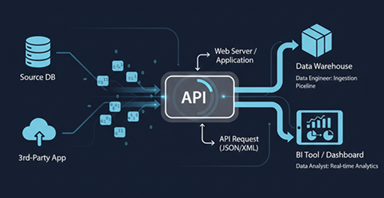
APIs are used to build robust pipelines that feed your data warehouse. Also APIs are created to serve cleaned, processed data to the
consumer which could be for Analytics, Reporting Dashboard or AI / Machine Learning.
APIs can feed data in trickling, event-based streams or big data stream of real-time data from IoT devices / live metrics from stock prices or social media.
For Data Analysts, APIs are a direct line to real-time insights. They let you query data that isn't yet in the warehouse. You can connect APIs to BI tools for live, automated dashboards.
This bypasses stale data and accelerates your analysis. In short, APIs are the pipes that connect data sources to data consumers.
This Python Code creates a simple Employee Management API using the Python's FastAPI framework.
It allows a user to perform basic "CRUD" (Create, Read, Update, Delete) operations for employee records.
import uuid
from fastapi import FastAPI, HTTPException, status
from pydantic import BaseModel, Field, UUID4
from datetime import date
from typing import Optional

# Initialize the FastAPI app
app = FastAPI(
    title="Employee Management API (Integer emp_id, UUID Internal Keys)",
    description="API using an internal UUID 'id' (API key) and an integer user-assigned 'emp_id' for routing."
)


# Define the Pydantic V2 model for an Employee
class Employee(BaseModel):
    # 'id' is the internal unique database key (UUID/API Key) - server generated
    id: Optional[UUID4] = None

    # 'emp_id' is the user-assigned unique business ID (integer)
    emp_id: int = Field(..., example=101)
    emp_name: str = Field(..., example="Jane Doe")
    city: str = Field(..., example="London")
    country: str = Field(..., example="UK")

    # Field name changed to emp_dob as requested
    emp_dob: date = Field(..., example="1990-01-15")

    model_config = {
        "json_schema_extra": {
            "examples": [
                {
                    "emp_id": 101,
                    "emp_name": "Jane Doe",
                    "city": "London",
                    "country": "UK",
                    "emp_dob": "1990-01-15"  # Key updated in example
                }
            ]
        }
    }


# Simple in-memory database:
# Key: internal 'id' (UUID object), Value: Employee object
employees_db: dict[uuid.UUID, Employee] = {}


# --- Helper Functions to Find Employee by Business emp_id ---
def find_employee_by_emp_id_internal(user_emp_id: int) -> Optional[Employee]:
    """Helper to iterate through values and find the matching integer emp_id."""
    for employee in employees_db.values():
        if employee.emp_id == user_emp_id:
            return employee
    return None


def find_employee_key_by_emp_id_internal(user_emp_id: int) -> Optional[uuid.UUID]:
    """Helper to find the internal UUID key for a given integer emp_id."""
    for key, employee in employees_db.items():
        if employee.emp_id == user_emp_id:
            return key
    return None


# --- API Endpoints ---

# Root Endpoint
@app.get("/")
def read_root():
    return {"message": "Welcome to the Employee Management API. Use 'emp_id' in routes like /employees/101"}


# Create Employee (POST)
@app.post("/employees/", response_model=Employee, status_code=status.HTTP_201_CREATED)
def create_employee(employee_input: Employee):
    """
    Create a new employee record. The server assigns an internal UUID 'id' (API Key),
    but the client provides the unique business integer 'emp_id'.
    """
    if find_employee_by_emp_id_internal(employee_input.emp_id):
        raise HTTPException(
            status_code=status.HTTP_409_CONFLICT,
            detail=f"Employee business ID '{employee_input.emp_id}' already exists"
        )

    internal_uuid_key = uuid.uuid4()
    employee_to_save = employee_input.model_copy(update={"id": internal_uuid_key})

    employees_db[internal_uuid_key] = employee_to_save
    return employee_to_save


# Read All Employees
@app.get("/employees/", response_model=list[Employee])
def get_all_employees():
    return list(employees_db.values())


# Read Single Employee by emp_id (GET)
@app.get("/employees/{emp_id}", response_model=Employee)
def get_employee_by_emp_id(emp_id: int):
    """Retrieve an employee using their user-assigned integer emp_id."""
    employee = find_employee_by_emp_id_internal(emp_id)
    if not employee:
        raise HTTPException(status_code=404, detail=f"Employee with emp_id '{emp_id}' not found")
    return employee


# Update Employee by emp_id (PUT)
@app.put("/employees/{emp_id}", response_model=Employee)
def update_employee_by_emp_id(emp_id: int, updated_details: Employee):
    """
    Updates the entire record for a specific employee using their user-assigned integer emp_id.
    """
    internal_uuid_key = find_employee_key_by_emp_id_internal(emp_id)

    if internal_uuid_key is None:
        raise HTTPException(status_code=404, detail=f"Employee with emp_id '{emp_id}' not found")

    if emp_id != updated_details.emp_id:
        raise HTTPException(status_code=400, detail="Employee business ID in URL must match ID in the request body.")

    # Preserve the *original* internal 'id' (UUID/API key) during the update operation
    employee_to_save = updated_details.model_copy(update={"id": internal_uuid_key})

    employees_db[internal_uuid_key] = employee_to_save
    return employee_to_save


# Delete Employee by emp_id (DELETE)
@app.delete("/employees/{emp_id}", status_code=status.HTTP_204_NO_CONTENT)
def delete_employee_by_emp_id(emp_id: int):
    """Delete an employee using their user-assigned integer emp_id."""
    internal_uuid_key = find_employee_key_by_emp_id_internal(emp_id)

    if internal_uuid_key is None:
        raise HTTPException(status_code=404, detail=f"Employee with emp_id '{emp_id}' not found")

    del employees_db[internal_uuid_key]
    return f"Employee with emp_id '{emp_id}' deleted successfully."
The most important design choice in this code is its use of two different types of IDs:
emp_id(Integer): This is the public-facing or business ID (e.g.,101,102). This is the ID the user provides and uses in the API URLs (like/employees/101).id(UUID): This is the internal database key. It's a long, unique string (a UUID, e.g.,f47ac10b-58cc-4372-a567-0e02b2c3d479) generated by the server. This is what the code actually uses to find the data in its internalemployees_dbdictionary.
The code uses helper functions to translate the user's simple emp_id into the system's internal id (UUID) to find, update, or delete the correct record.
Detailed Code Breakdown
Here is a section-by-section explanation of what each part does.
1. Imports
uuid: Used to generate the unique internal IDs (uuid.uuid4()).FastAPI,HTTPException,status: Core components from FastAPI.FastAPIis the main class,HTTPExceptionis used to send error responses (like 404 Not Found), andstatusprovides convenient names for HTTP status codes (likestatus.HTTP_404_NOT_FOUND).BaseModel,Field,UUID4: Components from Pydantic.BaseModelis the class all data models inherit from.Fieldis used to add more validation and metadata (like...which means "required").UUID4is a data type for validating UUIDs.date: A standard Python type for storing the employee's date of birth.Optional: A standard Python type hint to indicate that a field (like the internalid) might beNone.
2. FastAPI App Initialization
  app = FastAPI(
            title="Employee Management API (Integer emp_id, UUID Internal Keys)",
            description="API using an internal UUID 'id' (API key) and an integer user-assigned 'emp_id' for routing."
        )
This line creates the main FastAPI application instance. The title and description you provide here will automatically appear in the API's documentation (which FastAPI generates for you).
3. Pydantic Data Model (Employee)
  class Employee(BaseModel):
            id: Optional[UUID4] = None
            emp_id: int = Field(..., example=101)
            # ... other fields
This Employee class defines the "shape" of your data. Pydantic uses this to:
- Validate incoming data (e.g., ensure
emp_idis an integer andemp_dobis a valid date). - Serialize outgoing data (convert the Python object to JSON for the response).
- Generate Documentation: The
examplevalues will be used in the API docs.
Key fields:
id: Optional[UUID4] = None: This is the internal UUID. It'sOptionalbecause when a user creates an employee, they won't provide this. The server will generate it.emp_id: int = Field(...): This is the required business ID that the user must provide.
4. In-Memory Database
employees_db: dict[uuid.UUID, Employee] = {}
This is a simple Python dictionary that acts as your database.
- Key: The dictionary key is the internal
uuid.UUID(theidfield). - Value: The dictionary value is the complete
Employeeobject.
Because this is an "in-memory" database, all data will be lost every time you restart the server.
5. Helper Functions
Since the API user only knows the emp_id (integer) but the database is keyed by the id (UUID), these functions act as translators.
find_employee_by_emp_id_internal(user_emp_id: int): This function loops through all the values (theEmployeeobjects) in theemployees_dband returns the firstEmployeeobject that matches theuser_emp_id.find_employee_key_by_emp_id_internal(user_emp_id: int): This function is more important forPUTandDELETE. It loops through the key-value pairs and returns the internal UUID key associated with the matchinguser_emp_id.
6. API Endpoints (The Routes)
This is the main logic of your API.
@app.get("/")- Purpose: A simple "welcome" endpoint.
- URL:
http://localhost:8000/
@app.post("/employees/", ...)- Purpose: Create a new employee.
- Logic:
- It receives an
employee_inputobject in the request body (validated by Pydantic). - It uses
find_employee_by_emp_id_internalto check if an employee with thatemp_idalready exists. - If so, it raises a
409 CONFLICTerror. - If not, it generates a new
internal_uuid_keyusinguuid.uuid4(). - It creates a copy of the input data, adding the new UUID to the
idfield. - It saves this complete object to the
employees_dbusing the new UUID as the key. - It returns the newly created employee object and a
201 CREATEDstatus.
- It receives an
@app.get("/employees/")- Purpose: Get a list of all employees.
- Logic: It simply returns a list of all the values from the
employees_dbdictionary.
@app.get("/employees/{emp_id}", ...)- Purpose: Get a single employee by their
emp_id. - Logic:
- It takes the
emp_id(as an integer) from the URL path. - It uses
find_employee_by_emp_id_internalto find the matchingEmployeeobject. - If not found, it raises a
404 NOT FOUNDerror. - If found, it returns the
Employeeobject.
- It takes the
- Purpose: Get a single employee by their
@app.put("/employees/{emp_id}", ...)- Purpose: Update an existing employee.
- Logic:
- It takes
emp_idfrom the URL and theupdated_detailsfrom the request body. - It uses
find_employee_key_by_emp_id_internalto find the internal UUID key for the employee with thatemp_id. - If not found, it raises a
404 NOT FOUND. - It checks if the
emp_idin the URL matches theemp_idin the request body. If not, it raises a400 BAD REQUESTerror. - Crucially, it copies the
updated_detailsbut forces theidfield to be the originalinternal_uuid_keyit found in step 2. This ensures the internal UUID key never changes. - It overwrites the old entry in the
employees_dbwith this new, updated object. - It returns the updated object.
- It takes
@app.delete("/employees/{emp_id}", ...)- Purpose: Delete an employee by their
emp_id. - Logic:
- It takes the
emp_idfrom the URL. - It uses
find_employee_key_by_emp_id_internalto find the internal UUID key. - If not found, it raises a
404 NOT FOUND. - If found, it uses
del employees_db[internal_uuid_key]to remove the employee from the dictionary. - It returns a
204 NO CONTENTstatus, which is standard practice for a successfulDELETEoperation (it signals success without sending any data back).
- It takes the
- Purpose: Delete an employee by their
How to Run This Code
- Code at GitHub: You can download the complete code from
main.py. - Install dependencies: Open your terminal and install FastAPI and the Uvicorn server:
pip install fastapi "uvicorn[standard]" - Run the server: In the same terminal, run this command:
uvicorn main:app --reloadmain: The name of your file (main.py).app: The name of theFastAPI()object in your code.--reload: This makes the server restart automatically every time you save changes to the file. (Remember it will reset your in-memory database.)
- View the API Docs: Open your browser and go to
http://127.0.0.1:8000/docs. You will see an interactive documentation page where you can test all your API endpoints.
If you are looking for more advanced Python API, → Python API (Intermediate Level) Python API (Advanced Level)