Data Extraction (E)
If you are looking for Transformation or Loading of Data, → Data Transformation (T) Data Loading (L)
Extraction, in a general context, refers to the act or process of pulling or drawing something out from a source or larger whole.
In a data and computing context, the term "extraction" specifically refers to the process of retrieving data from various sources (such as databases, websites, documents, or APIs) for further processing, analysis, or storage in another system [4]. This is the first crucial step in data management processes like ETL (Extract, Transform, Load) or ELT (Extract, Load, Transform).
The goal of data extraction is to gather raw, relevant information and bring it into a format where it can be cleaned, structured, and utilized effectively. Methods vary widely depending on the nature of the source data, ranging from manual entry and automated web scraping to using specialized APIs or database queries.
1. Manual Data Extraction (Not Recommended)
This traditional method involves a person manually collecting data from various sources, such as copying information from a PDF into a spreadsheet.
- Best for: Small, one-off tasks or when automated solutions are not feasible.
- Drawbacks: Time-consuming, highly prone to human error, and not scalable for large volumes of data.
2. Optical Character Recognition (OCR) and Intelligent Document Processing (IDP)
OCR technology converts printed or handwritten text within scanned documents or images into machine-readable data. When combined with Artificial Intelligence (AI) and Machine Learning (ML), this becomes IDP, which can interpret context and extract data from semi-structured or unstructured documents (e.g., invoices and contracts).
- Best for: Extracting data from physical or scanned documents.
- Key Feature: AI-powered OCR can learn from diverse layouts and achieve high accuracy regardless of font or format.
To implement Optical Character Recognition (OCR) in Python, the most common and accessible method
uses the pytesseract library,
a wrapper for Google's Tesseract OCR engine.
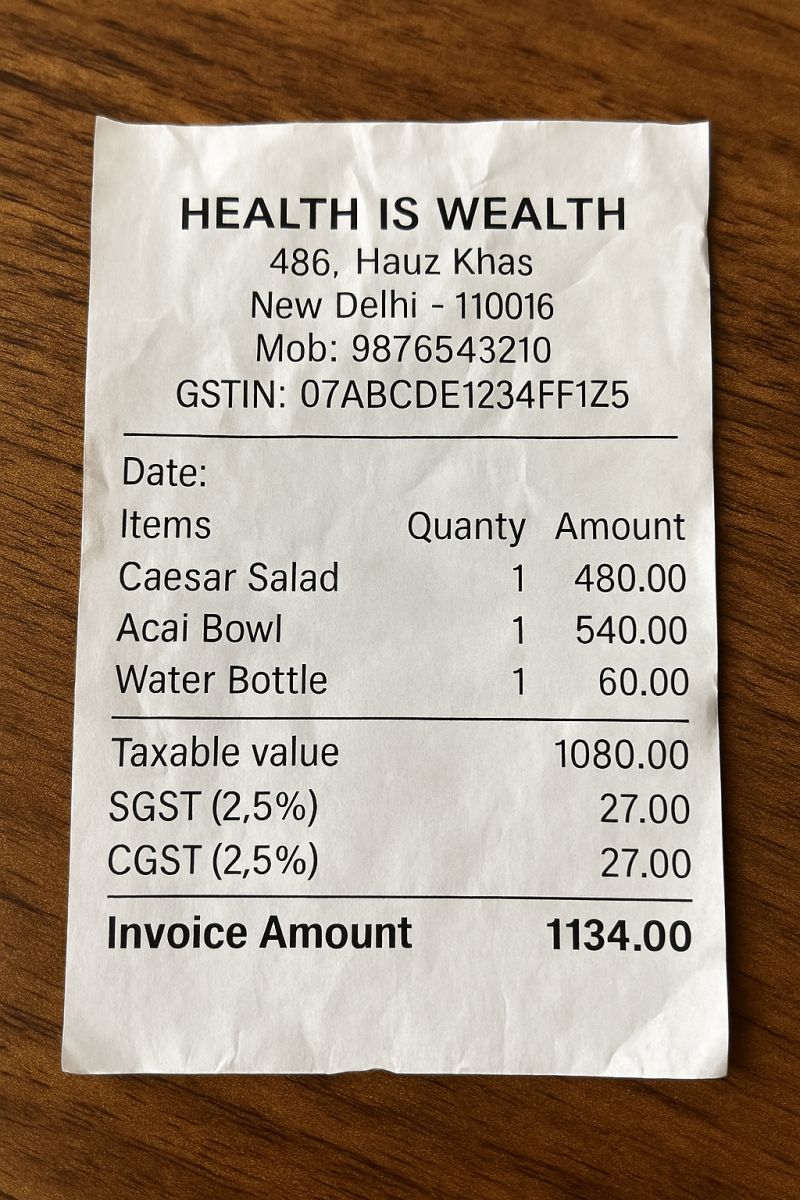
I am demonstrating the OCR process in the most simlest way
possible using a sample image of a scanned receipt.
The following Python code extracts text from the image and prints it to the console.
If you're looking a more advanced example of scanned
documents data extraction using OCR + PostgreSQL database, please visit my GitHub respository
Scanned documents OCR to structured dataframes into
PostgreSQL page.
- Install the Tesseract OCR engine: This is a separate executable program that must be installed on your system. You can find installers and instructions on the official Tesseract documentation site.
- Install Python libraries: Install pytesseract and Pillow (PIL) using pip.
pip install pytesseract Pillow
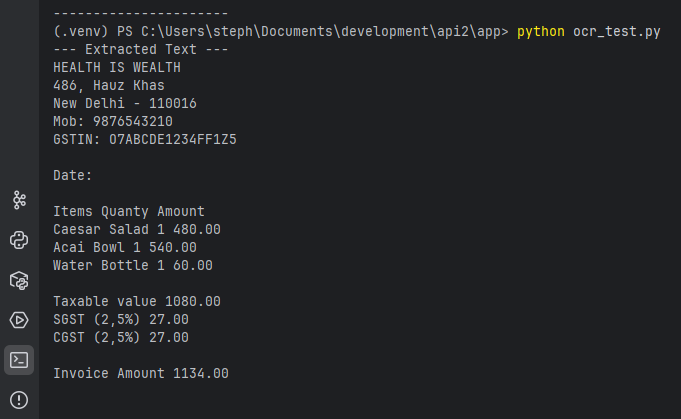
This script opens an image file and prints the text found within it.
The Uploaded image file is named scan-receipt001.jpg.
Please make sure the image resolution should be scanned at a high quality (atleast 300 DPI) for better OCR results.
 from PIL import Image
 import pytesseract

 # --- Configuration (Windows users only) ---
 # If Tesseract is not in your system's PATH, you need to specify its location.
 # Common paths are listed below. Uncomment and modify the line that applies to you.
 # pytesseract.pytesseract.tesseract_cmd = r'C:\Program Files\Tesseract-OCR\tesseract.exe'
 # pytesseract.pytesseract.tesseract_cmd = r'C:\Program Files (x86)\Tesseract-OCR\tesseract.exe'

 # --- Main OCR Logic ---

 # 1. Define the path to your image file
 image_path = 'scan-receipt001.jpg'

 # 2. Open the image using the Pillow (PIL) library
 try:
    image = Image.open(image_path)
 except FileNotFoundError:
    print(f"Error: The file '{image_path}' was not found.")
    print("Please make sure the image file exists or update the 'image_path' variable.")
    exit()

 # 3. Use pytesseract to perform OCR on the image
 extracted_text = pytesseract.image_to_string(image)

 # 4. Print the extracted text to the console
 print("--- Extracted Text ---")
 print(extracted_text)
 print("----------------------")
The result in the terminal run is:
3. Web Scraping
This automated method uses bots or crawlers to extract data directly from websites by parsing the HTML content. This data is then typically exported into a structured format like a CSV or JSON file.
- Best for: Gathering large amounts of public web data for market research, price monitoring, or news aggregation.
- Considerations: Websites can use anti-scraping measures (like CAPTCHAs), and the legality and ethics of scraping must be considered.
All the steps of scraping involves (i am using a simple example)
The most common libraries used for web scraping in Python are BeautifulSoup and Requests.Common use-case:A common business use case is price monitoring for e-commerce. An online retailer might use a web scraper to gather product names and prices from competitors' websites to inform their own dynamic pricing strategy.
For this, you would need to install the libraries first (
pip install requests beautifulsoup4).
 import requests
 from bs4 import BeautifulSoup
 import json
 import csv
 import os


 def scrape_quotes_to_json(filename='quotes_with_links.json'):
    """
    Scrapes quotes, authors, and author links from a website and saves them to a JSON file.
    """
    base_url = 'https://quotes.toscrape.com/'


    print(f"Attempting to scrape data from: {base_url}")
    response = requests.get(base_url)
    scraped_data = []

    if response.status_code == 200:
        soup = BeautifulSoup(response.content, 'html.parser')
        quotes = soup.find_all('div', class_='quote')

        for quote_div in quotes:
            text = quote_div.find('span', class_='text').text.strip()
            author = quote_div.find('small', class_='author').text.strip()
            author_link_tag = quote_div.find('small', class_='author').find_next_sibling('a')
            about_link = 'Link not found'
            if author_link_tag and 'href' in author_link_tag.attrs:
                relative_link = author_link_tag['href']
                about_link = requests.compat.urljoin(base_url, relative_link)

            scraped_data.append({
                'quote': text,
                'author': author,
                'about_link': about_link
            })

        try:
            with open(filename, 'w', encoding='utf-8') as f:
                json.dump(scraped_data, f, ensure_ascii=False, indent=4)
            print(f"✔ Data successfully scraped and saved to {filename}")
        except IOError:
            print(f"❌ I/O error while writing to {filename} file.")
    else:
        print(f"❌ Failed to retrieve the webpage. Status code: {response.status_code}")


 def convert_json_to_csv(json_filename='quotes_with_links.json', csv_filename='quotes_output.csv'):
    """
    Reads data from a JSON file and converts it into a CSV file using Python's built-in csv module.
    """
    if not os.path.exists(json_filename):
        print(f"❌ Error: {json_filename} not found.")
        return

    try:
        with open(json_filename, 'r', encoding='utf-8') as f:
            data = json.load(f)
    except json.JSONDecodeError:
        print(f"❌ Error decoding JSON from the file {json_filename}.")
        return
    except IOError:
        print(f"❌ I/O error while reading {json_filename}.")
        return

    if not data:
        print("ℹ The JSON file is empty, nothing to convert.")
        return

    # Use keys from the first dictionary as field names (headers)
    fieldnames = data[0].keys()

    try:
        with open(csv_filename, 'w', newline='', encoding='utf-8') as csv_file:
            writer = csv.DictWriter(csv_file, fieldnames=fieldnames)
            writer.writeheader()
            writer.writerows(data)
        print(f"✔ Data successfully converted from {json_filename} to {csv_filename}")
        print(f"File location: {os.path.abspath(csv_filename)}")
    except IOError:
        print(f"❌ I/O error while writing to {csv_filename} file.")
    except Exception as e:
        print(f"An unexpected error occurred during CSV conversion: {e}")


 # --- Execution ---
 if __name__ == "__main__":
    json_file_name = 'quotes_with_links.json'
    csv_file_name = 'quotes_output.csv'

    # Step 1: Scrape data to JSON
    scrape_quotes_to_json(json_file_name)

    # Add a visual separator
    print("\n" + "=" * 40 + "\n")

    # Step 2: Convert JSON data to CSV
    convert_json_to_csv(json_file_name, csv_file_name)
TO RUN THE CODE:
1. Save the code in a Python file, e.g., web_extract.py # you can change the name as
per your wish.
2. Open your terminal or command prompt.
3. Navigate to the directory where the file is saved.
4. Run the script by typing python web_extract.py and pressing Enter.
5. After execution, you will find two new files in the same directory:
quotes_with_links.json and quotes_output.csv.
I will show the website, json file and csv file - which can be tested by you as well.
Website: https://quotes.toscrape.com/
JSON File: quotes_with_links.json
CSV File: quotes_output.csv
4. API Integration
Many modern platforms and web services offer Application Programming Interfaces (APIs) that provide a
structured, efficient, and reliable way to access specific data programmatically. Developers send
requests to endpoints, and the API returns data in a predictable format, such as JSON or
XML.
The API method is generally preferred over web scraping when available, as it is more stable and
less likely
to break with changes to the source website.
I have provided a detailed article on working with data using API + database in my API using FastAPI page.
- Best for: Accessing data from SaaS platforms (e.g., CRM or social media) with real-time or near real-time updates.
- Advantage: APIs offer a stable interface that is less likely to break than web scraping if the source changes.
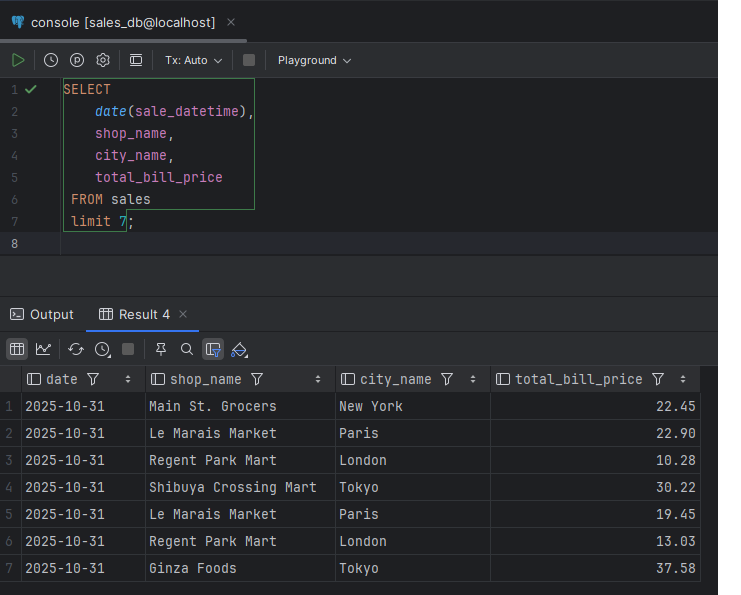
5. Database Extraction (SQL Queries)
When data resides in a structured database (like PostgreSQL, MySQL, or SQL Server), direct queries
(e.g., SQL) can be used to retrieve the exact data subset needed.
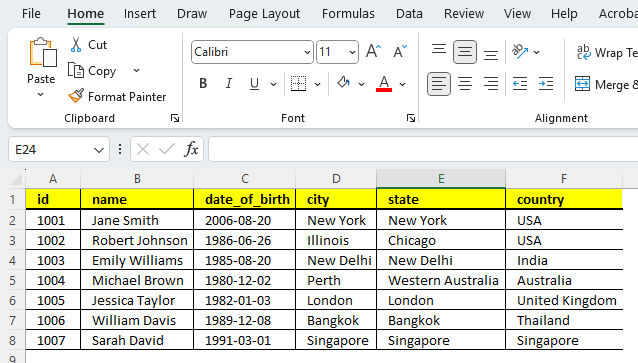
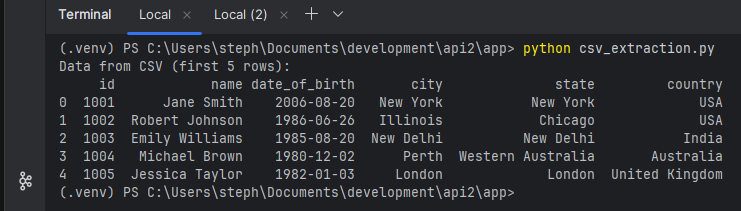
I will also demostrate to extract data from csv also.
- Best for: Accessing highly structured internal data with speed and precision.
- Requirements: Requires technical knowledge of database languages and proper authorization.
 # This is code for extracting data from a CSV file using pandas library in Python
 import pandas as pd
 import os

 # Define the file path
 csv_file_path = 'staff.csv'

 # Check if file exists for demonstration
 if not os.path.exists(csv_file_path):
    print(f"Error: {csv_file_path} not found.")
 else:
    # Read the CSV file into a pandas DataFrame
    df_csv = pd.read_csv(csv_file_path)

    # Extract/view the data
    print("Data from CSV (first 5 rows):")
    print(df_csv.head())

    # You can also access specific columns, e.g., df_csv['column_name']
Code to extract from PostgreSQL.
 # This is code for extracting data from a PostgreSQL database using pandas library in Python
 import pandas as pd
 from sqlalchemy import create_engine

 def extract_with_pandas(host, database, user, password, table_name):
    """
    Connects to PG using pandas and SQLAlchemy to extract data into a DataFrame.
    """
    try:
        # Create a database connection string
        # Format: 'postgresql://user:password@host:port/database'
        conn_string = f'postgresql://{user}:{password}@{host}:5432/{database}'

        # Create an engine
        engine = create_engine(conn_string)

        # Read data directly into a DataFrame
        df = pd.read_sql_table(table_name, con=engine)

        print(f"Data successfully loaded into a pandas DataFrame from table '{table_name}':")
        print(df.head())
        print(f"DataFrame shape: {df.shape}")
        return df

    except Exception as e:
        print(f"Error using pandas to connect to PostgreSQL: {e}")
        return None

 # --- Configuration (same as above) ---
 DB_HOST = "localhost"
 DB_NAME = "<\database_name\>"
 DB_USER = "<\username\>"
 DB_PASSWORD = "<\password\>"
 TABLE = "<\table_name\>"

 # --- Run the pandas function ---
 if __name__ == "__main__":
    df_data = extract_with_pandas(
        DB_HOST,
        DB_NAME,
        DB_USER,
        DB_PASSWORD,
        TABLE
    )

6. Logical Extraction (Full vs. Incremental)
This is an approach within the ETL (Extract, Transform, Load) or ELT process.
- Full Extraction: Involves extracting all available data from a source system in one operation. It's ideal for initial data loading or smaller, static datasets.
- Incremental Extraction: Captures only the data that has changed or been added since the last extraction. This is far more efficient for dynamic, high-volume data sources like transactional databases.
7. AI-Enabled / Machine Learning Extraction
This advanced approach uses ML, Natural Language Processing (NLP), and deep learning to understand the context of data, especially from unstructured sources. These systems can learn from diverse data sets and adapt to changing layouts, which reduces the need for manual configuration or template creation.
- Best for: Processing complex, high-volume unstructured or semi-structured documents (like legal contracts or a stream of diverse emails) with high accuracy.
- Advantage: Automates complex extraction tasks that traditional methods struggle with, reducing manual intervention.
If you are looking for Transformation or Loading of Data, → Data Transformation (T) Data Loading (L)